Showing posts with label How to do?. Show all posts

Tuesday, May 6, 2014

10 Easy Steps to Uninstall Google Update Service from your Computer

First of all lets see how Google updater gets install, this will help in preventing you from getting the update service running in the background. If you are using any of the Google products, like Google Desktop, Google gears, Google Talk, Google Pack and Google Earth the updater gets installed and starts running in the background silently.
Scroll down if you are looking for the Mac OS X Guide

Tuesday, November 6, 2012

How To Use YouTube In Pakistan Without Using Proxy sites


These days YouTube is banned in Pakistan and you can't access youtube directly through your Internet so there are many ways to open YouTube in Pakistan Like using proxy sites but using Proxy sites you can't get fully access through youtube. You can't Login, comment or like any video even video player is changed which is really disturbing for visitors from Pakistan so Today I got one solution for your its easy and using this method you can Fully Access YouTube without any problem through your browser.
---------------------------------------------------------------------------------------------------------------

HotSpot Shield is the software which helps you to access any blocked website any time any where
---------------------------------------------------------------------------------------------------------------

About Hotspot Shield

  • Secure your web session, data, online shopping, and personal information online with HTTPS encryption.
  • Protect yourself from identity theft online.
  • Hide your IP address for your privacy online.
  • Access all content privately without censorship; bypass firewalls.
  • Complete Wi-Fi Security at public hotspots, hotels, airports, and corporate offices.

Works on wireless and wired connections alike.
Provides Unlimited Bandwidth.

Works on the PC and the Mac, including new operating systems (Windows 7 and Snow Leopard)
Hotspot Shield protects your entire web surfing session; securing your connection at both your home Internet network & Public Internet networks (both wired and wireless). Hotspot Shield protects your identity by ensuring that all web transactions (shopping, filling out forms, downloads) are secured through HTTPS. Hotspot Shield also makes you private online making your identity invisible to third party websites and ISP‘s. Unless you choose to sign into a certain site, you will be anonymous for your entire web session with Hotspot Shield. We love the web because of the freedom that it creates to explore, organize, and communicate. Hotspot Shield VPN Client enables access to all information online, providing freedom to access all web content freely and securely. Secure your entire web session and ensure your privacy online; your passwords, credit card numbers, and all of your data is secured with Hotspot Shield. Standard antivirus software protects your computer, but not your web activities.
That‘s why AnchorFree is pleased to offer Hotspot Shield. Our application keeps your Internet connection secure, private, and anonymous.

100% Security Through a VPN

Hotspot Shield creates a virtual private network (VPN) between your laptop or iPhone and our Internet gateway. This impenetrable tunnel prevents snoopers, hackers, ISP‘s, from viewing your web browsing activities, instant messages, downloads, credit card information or anything else you send over the network. Hotspot Shield security application is free to download, employs the latest VPN technology, and is easy to install and use.
So go ahead - Get behind the Shield - Try Hotspot Shield today!
Hotspot Shield runs on:
  • Windows XP
  • Windows Vista
  • Windows 7
  • Windows 8
  • Mac OS X (10.5 Leopard)
  • Mac OS X (10.6 Snow Leopard)
  • Mac OS X (10.7 Lion)
  • Mac OS X (10.8 Mountain Lion)
By clicking on the download button, you are agreeing to the Hotspot Shield terms of use.
If you decide to uninstall Hotspot Shield at any time, please, follow the usual steps: select "Control Panel" from Start menu, click "Add or Remove Programs", highlight "Hotspot Shield" entry and click "Change/Remove" button.

Tuesday, August 28, 2012

Radeon HD 7950 Increase Performance with Upgrade

AMD just released a BIOS update that will boost performance of the Radeon HD 7950 by increasing the clock frequency of the GPU and turbo boost clock, the new BIOS file will increase the core frequency from 800 to 900 MHz, this step is to counter the Nvidia's GTX GeForce GTX 660 Ti performance, the video memory in still the same.

This update apply only for reference design HD 7950 cards with 3GB of Video memory, bellow the BIOS specifications as mentioned on TPU.
GPU Device Id: 0x1002 0x679A
113-C3864000-100
Tahiti B0 CR PRO C38602 GDDR5 3GB 500e/150m
(C) 1988-2010, Advanced Micro Devices, Inc.
ATOMBIOSBK-AMD VER015.022.000.001.001496
C3864000.100
Clock State 0
  Core Clk: 925.00 MHz
  Memory Clk: 1250.00 MHz
  Flags: Boot
Clock State 1
  Core Clk: 925.00 MHz
  Memory Clk: 1250.00 MHz
  Flags: Optimal Perf
Clock State 2
  Core Clk: 850.00 MHz
  Memory Clk: 1250.00 MHz
  Flags: UVD
Clock State 3
  Core Clk: 300.00 MHz
  Memory Clk: 150.00 MHz
  Flags: 
That's not all, using the PowerTune tool the GPU can goes up to 925 MHz on boost mode, check out the GPU-Z snap bellow comparing the old default clocks and the new BIOS update set.


Dont do this if you don't know what you are doing, you can use TPU BIOS editor from here
Download HD 7950 boosted BIOS update

Saturday, August 18, 2012

Free Trick to Unlock Huawei and ZTE HSDPA Modem

I wrote this article because most of people trying to unlock
their HSDPA modem,because some modem s works for just
 1 network.after unlock you can use any networks. It takes
just few seconds to unlock your modem


1. Unlock Huawei  HSDPA modems

When  we put some other network sim card it will ask some code.So im going to generate that code.It is easy.first of all you have to find your IMEI of mode.it will mention on your modem or modem box its 15 digit.now follow this.

 i.  Paste this below address to your address bar.
http://bb5.at/huawei.php?imei= your Huawei modem IMEI number 

ii. Now replace your Huawei modem IMEI number with your IMEI number like below
http://bb5.at/huawei.php?imei=357133035912053 
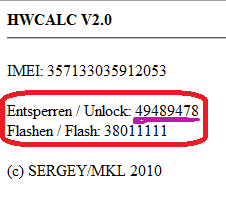
iii. Press Enter key,after you will see like this

 
iv. Now enter this unlock code when it ask the code. you are done.


2 . Unlock ZTE  HSDPA modems


Some ZTE modems not asking unlock code.so no where to input our code.
so you can't do it like above method.you have to use some software for this.

Download software click here

i. First of all, if you use some memory card, remove it. remove sim  card
   and put sim card what you want to unlock.(it will display invalid sim)

ii.Plug your modem  in to your computer,sometime connection manager will display,close it.

iii. Unzip what you download and open dccrap.exe


iv. First select the manufacture as ZTE datacards  ( No: 1)

v. Select the model as Auto detect (recommended)  (No : 2 ) If you know the model and
     which com port you use.u can do that way also

vi. Click find button  (No: 3) . after your modem model will display below box

vii. After detect modem click unlock button (No: 4 )

cheers you are done.After few seconds modem will unlock restart your computer and use
your modem.This connection manager also working for this.
But if you want to use  ZTE connection manager click below link to download.

click here to download.
Thank you.

Thursday, April 12, 2012

What Is A Blog and How To Create A Blog?

questionsThere are many people who still do not understand what a blog is or why is blogging so much expanding in the cyberspace. I feel all these people deserve the right to know what a Blog is and how can a Blog be created along with some other similar questions. So for those who just heard of a Blog from their friends, media or any other source, here is a short and precise illustrative tutorial to help you find answers to four important questions in most people’s mind.
Which are,
  1. What is a Blog?
  2. How do I create a Blog?
  3. What is the advantage of blogging?
  4. What is Blogger or Wordpress?
Now here comes some useful answers for each demanded question

What is a Blog?

A blog is nothing but an Online Notebook Diary. What do we write in a notebook diary? Of course stuff that we like and things that we feel important to be recorded and shared with our friends and family. A notebook diary can be based on any topic that you like for example you can write on your  hobbies, activities, poems, songs, tutorials, pets, home and family, your personal thoughts etc. People will read your Online Notebook Diary on daily basis and will leave you a comment, suggestion or feedback.
If you write about your personal experiences in a notebook made up of papers, then your writings will reach only limited people around you but with an online diary like a Blog you speak to the world!
So in short a blog is your Personal website where you write and share things you like with millions of people out there who are eager to read what is cooking in your mind!
The video below will give you a more illustrative view of a Web Blog.

How do I create a Blog?

Creating a blog is absolutely free. There are many quality Blogging hosting services that you can choose to create a blog but the best among them is Blogger. I have created this blog with Blogger without even paying a penny! Want to know how? Watch this video to know how to create a blog in less than Five minutes!


What is the advantage of blogging?

You pay nothing Instead you Earn in $$ !! You earn by displaying advertisements on your Blog. People are earning from $100 to $100,000 monthly! I am not kidding an example is shoemoney.com and problogger.net
Plus you will make new friends in the Blogosphere and you earn respect in the eyes of thousands of people. You can become a celebrity! But all this with a little hard work and great patience.
And the best advantage which I have experienced is that you learn every second online! Your internet and computer skills will improve to an extreme edge and this is what the coming era demands from you. Every second on blogging is undoubtedly a new experience! I have learnt HMTL, CSS, XML and a bit of JavaScript without taking any classes. I learnt them all within a year of my blogging career and today I am able to design a quality blogger template in less than three hours MashAllah!

What is Blogger or Wordpress?

These are the major blogging platforms which help you create a free Blog.  But if you are confused which one to start with then go for Blogger. It has many features which wordpress doesn’t have and the best part is that Blogger allows you to customize your template in any way you like by editing the CSS style sheet! So what are you looking? Start blogging now and build up a new cyber life. Best of luck!
To know in detail whether Blogger is better or WordPress then read this post –> Comparison Chart 2010 for WordPress Vs Blogger
Feel free to ask any question that is still troubling your mind. Take care :>